Yuhox NetKit.
Everything you can see, test and change on the network, in one interface.
How to start
Match the workflow first
What is still in development we will not describe as ready. Tell us what you need to do; we will say whether we cover it now.
Trial or a pilot
If a pilot fits, we install it. If it does not, we say so — we do not force a sale.
Buy after it ships
Prices are on the pricing page. We will not put a placeholder number for something not priced yet.
What it solves
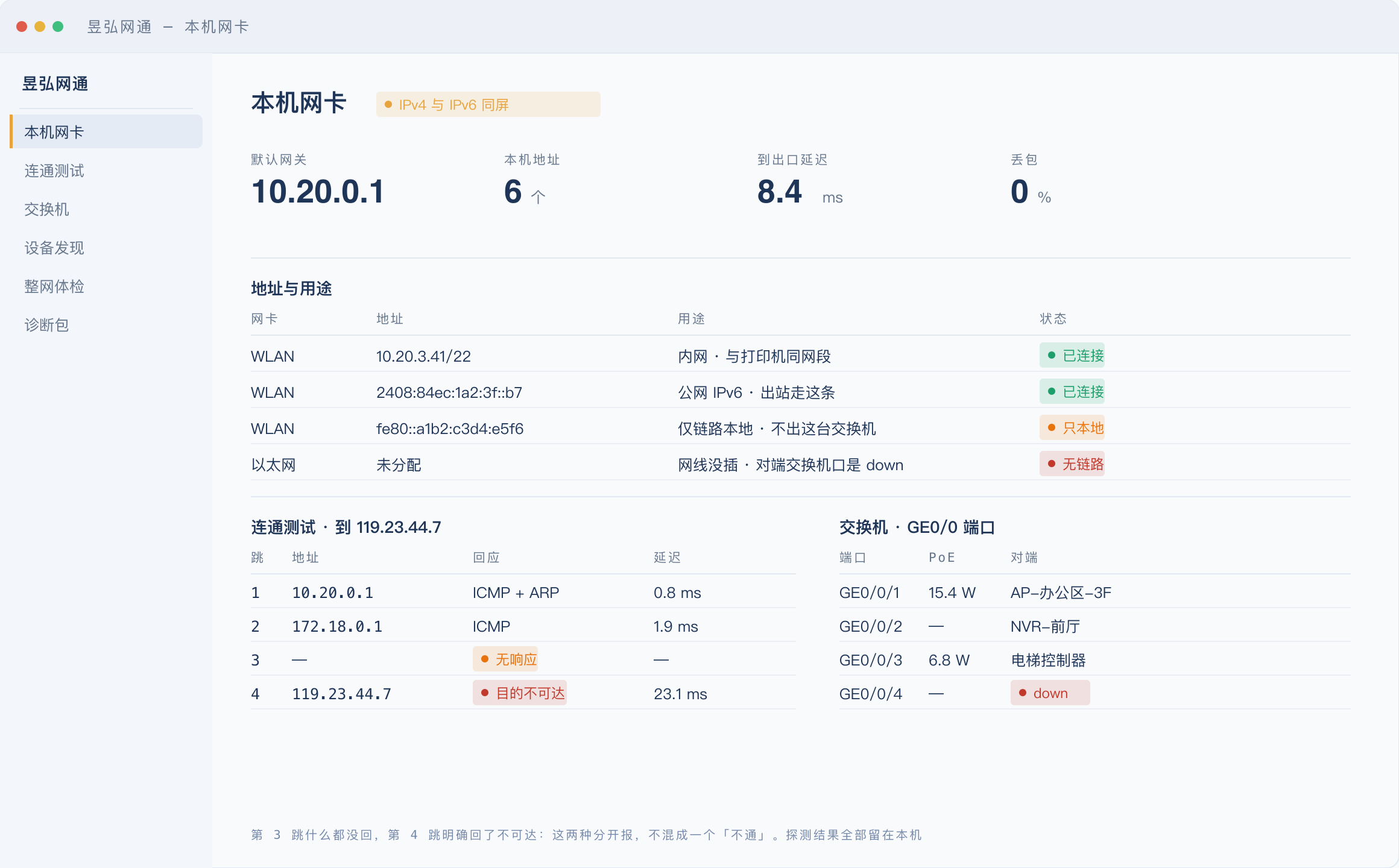
On-site network troubleshooting mostly burns time on typing commands and starting over on each new device: changing adapter addresses, scanning ports, finding devices, probing what picture a camera actually puts out, logging into a box to read logs. No single step is hard; what's hard is running through all of them again on every machine. Yuhox NetKit turns these into buttons: install it on one machine and everything you can view, test or change on the network is in one interface. It has the features other people's routers have, plus the troubleshooting ability those routers don't. The source code is public, and non-commercial use is free.
Before and now
| Before | Now |
|---|---|
| Check a network once, retype the commands from scratch on every machine | Install on one machine; viewing, testing and changing are buttons, and switching devices doesn't mean starting over |
| IPv6 stuffed into a corner; unclear which addresses the adapters actually have | IPv4 and IPv6 side by side: what each address can do and which is local-only, clear on one screen |
| Want to know what picture a camera puts out? Install a player or transcoder first | Enter a stream URL and it tells you the codec, real resolution and frame rate directly |
| "No response" and "definitely unreachable" blur into one "down", and you troubleshoot in the wrong direction on site | It tells them apart: an unreachable reply means the path works and the problem is at the endpoint; receiving nothing means you don't even know whether the other side exists |
| Adapter or proxy settings changed temporarily, forgotten, and the next day something breaks | It shows what it wants to change and only acts when you click; before acting it journals to disk, so even after a crash the next start can restore |
Core capabilities
- 01
Dual stack is not an add-on
IPv4 and IPv6 side by side. Which addresses each adapter has, what each can do, which is local-only — all clear on one screen. Not IPv6 stuffed into a corner.
- 02
Knows what a camera actually outputs
Enter a stream URL and it tells you the encoding format, the real resolution and the frame rate. No player to install and no transcoding software.
- 03
Tells "no response" apart from "definitely unreachable"
A reply of unreachable means the path works and the problem is at the endpoint; receiving nothing at all means you don't even know whether the other side exists. Blur the two into one "down" and you troubleshoot in the wrong direction on site.
- 04
Directly callable by AI
Set it up once and let AI look things up for you: every function it calls is one you can click yourself in the interface, and you can see what it has done.
- 05
Anything that changes the system is stated first
What it wants to change is put in front of you first, and nothing happens until you click. Before it acts, it journals the change to disk, so a crash can still be reverted on the next start.
- 06
Check switch ports without hunting for labels
A SNMP read shows whether a port is up, whether PoE is supplying power, which device sits on the other end, and which port a MAC hangs on. Add LLDP neighbors, and both ends of a cable match up.
- 07
A tree to follow down when you cannot say what broke
Troubleshoot by symptom: no internet, slow, packet loss, an address that will not open. It keeps asking downward, turning trial and error into a path that holds. The whole network can also run one health check and produce a conclusion you can send out as is.
- 08
More than viewing: you can change things
NIC addresses, routes, DHCP assignment and binding, starting a temporary DHCP server or file share, waking a powered-off machine (Wake-on-LAN), logging into devices to read logs and change settings. The hands-on jobs run in the same screen too.
- 09
Source published
The code is on GitHub: read it, change it, compile it yourself. Free for non-commercial use.
Who it is for
People doing on-site network troubleshooting and residency debugging
Anyone who's done retyping commands from scratch on every machine
People managing a batch of cameras and boxes
Anyone who needs the real picture of a stream without installing a player
Teams troubleshooting inside restricted networks
Probe and diagnostic results all stay on this machine; nothing is sent out
Anyone who wants AI to help check the network
Every feature the AI calls, you can click yourself in the UI and see what it did
Why this one
Dual stack is not an add-on
IPv4 and IPv6 on one screen, what each adapter address can do laid out together — instead of hiding IPv6 in a corner.
Saying "up or down" precisely
It distinguishes "they replied unreachable" from "we got nothing at all". Blur the two into one "down" and you troubleshoot in the wrong direction on site.
Anything that changes your system is always asked of you first
Anything that would touch your machine's settings is shown first and only runs when you click; it journals to disk before acting, and after a crash the next start restores first. Using this software never leaves your machine unable to return to how it was.
Switch ports need no label hunting
SNMP shows port up or down, PoE power, the device on the other end, and which port a MAC sits on. With LLDP neighbors, both ends of a cable match up.
When you cannot name the fault, there is a tree to follow down
Follow the symptom: no internet, slow, packet loss, an address that will not open, asking down the line. The whole network can also run one health check and produce a conclusion you can forward as is; the raw results of one session can be packed up and carried out.
There's no such thing as authorization in the software
No activation, no machine binding, no checks, no expiry. Free use and paid use run the exact same program.
Source published
The code is on GitHub: read it, change it, build it yourself. Non-commercial use is free.
Same job, two ways
The left column shows common on-site practices, without naming any product; the right column follows the version you actually get.
| Topic | Common practice | Yuhox NetKit |
|---|---|---|
| Checking a network once | Every device means starting over, retyping commands from scratch | Install on one machine; view, test and change are all buttons in one interface |
| IPv6 | IPv6 stuffed into a corner | Both stacks in view; what each adapter address can do, clear on one screen |
| What picture a camera puts out | Only visible after installing a player or transcoder | Enter a stream URL; get the codec, real resolution and frame rate directly |
| Up or down | Mixes "no response" and "definitely down" into one "down" | Says them apart: whether the path works, whether the problem is at the endpoint, or whether the other side isn't there at all |
| Changing system settings | Changes it directly; forget to revert and something breaks | Shown first for you to click; journaled to disk before acting; after a crash, the next start restores first |
| Licenses | After install you still have to find somewhere to enter a license key | No licensing mechanism in the software; buy or not, it's the same program running |
| Who is plugged into that switch port | Flip through patch-panel labels, shine a flashlight on them | SNMP and LLDP give the port, PoE, far-end device and MAC directly |
| How to report when the check is done | Screenshots pasted into a chat group, and nobody else can reproduce them | Pack one session into a diagnostic bundle; the conclusion can be forwarded as is |
Key parameters
| Form | Desktop software; everything viewable, testable and changeable on the network in one interface |
|---|---|
| Protocol | IPv4 and IPv6, both stacks in view |
| Stream probing | Enter a stream URL, get back the codec, real resolution and frame rate |
| Connectivity verdict | Tells "definitely unreachable" from "no response" instead of calling both "down" |
| AI calls | Can be exposed to AI calls; every feature is also clickable in the UI, and you can see what it did |
| Licenses | No licensing mechanism in the software: no activation, no machine binding, no checks, no expiry |
| Data | Probe results, diagnostic records and exported diagnostic bundles all stay on this machine; nothing is uploaded |
| Source code | Public on GitHub; read it, change it, build it yourself — non-commercial use is free |
| Pricing | Per day: 1 yuan for 1 day, enter any number of days. No packages, no minimum purchase. |
| Status | In development: the source is public, but an installable package hasn't been released yet |
The feature notes above change with versions; the version you actually download is what counts. This product is still in development: the source is public, but an installable package hasn't been released. Whether commercial use is restricted depends on your network's rules — confirm before use.
Up front
Can I download and install it now?
Not yet. The source is public — read it or build it yourself now; the UI and installer are still being finished, and once the packaging pipeline works we'll announce it on this page.
Do I need a license key?
No. There's no licensing mechanism in the software: no activation, no machine binding, no checks, no expiry. Free use and paid use run the exact same program.
Then what am I buying?
A license document and an invoice, for compliance records, bidding and audits — nothing to do with how the software runs.
How is it priced?
Per day: 1 yuan for 1 day, enter any number of days. No annual plans, no minimum purchase.
Where's the source code?
On GitHub: read it, change it, build it yourself. Non-commercial use is free.
Do probe and capture data get uploaded?
No. Probe results, capture contents and diagnostic records all stay on this machine; nothing is uploaded to us.
Can the AI change my machine directly?
No. The AI can query and suggest, but anything that would change your system only runs after you click it in the UI.
Hard constraints in the system
These are gates in the software — even a code change is not allowed to remove them. What is in the contract still governs.
No license mechanism in the software
No activation, no machine binding, no verification, no expiry. Using it free and using it with a license run exactly the same program.
The data is in your hands
Probe results, diagnostic records and exported diagnostic bundles all stay on this machine; nothing is uploaded to us.
AI cannot change your machine for you
AI can look things up and make suggestions, but any operation that changes your system runs only after you have clicked it in the interface.
Read the source for now
The code is public on GitHub: read it, change it, build it yourself. When an installable package is out, we'll announce it on this page.